Search Grid-Search#
A classic method to perform model-fitting is a grid search, where the parameters of a model are divided on to a grid of values and the likelihood of each set of parameters on this grid is sampled. For low dimensionality problems this simple approach can be sufficient to locate high likelihood solutions, however it scales poorly to higher dimensional problems.
PyAutoFit can perform a search grid search, which allows one to perform a grid-search over a subset of parameters
within a model, but use a non-linear search to fit for the other parameters. The parameters over which the grid-search
is performed are also included in the model fit and their values are simply confined to the boundaries of their grid
cell by setting these as the lower and upper limits of a UniformPrior.
The benefits of using a search grid search are:
For problems with complex and multi-model parameters spaces it can be difficult to robustly and efficiently perform model-fitting. If specific parameters are known to drive the multi-modality then sampling over a grid can ensure the parameter space of each individual model-fit is not multi-modal and therefore sampled more accurately and efficiently.
It can provide a goodness-of-fit measure (e.g. the Bayesian evidence) of many model-fits over the grid. This can provide additional insight into where the model does and does not fit the data well, in a way that a standard non-linear search does not.
The search grid search is embarrassingly parallel, and if sufficient computing facilities are available one can perform model-fitting faster in real-time than a single non-linear search. The PyAutoFit search grid search includes an option for parallel model-fitting via the Python
multiprocessingmodule.
Data#
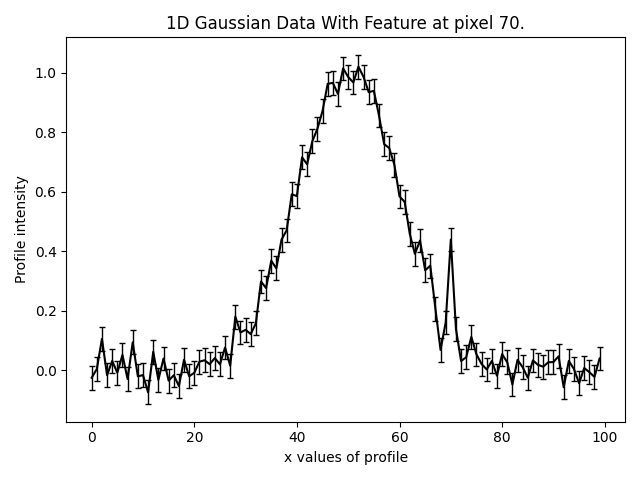
In this example we will demonstrate the search grid search feature, again using the example of fitting 1D Gaussian’s
in noisy data. This 1D data includes a small feature to the right of the central Gaussian, a second Gaussian
centred on pixel 70.
Basic Fit#
Without the search grid search we can fit this data as normal, by composing and fitting a model
containing two Gaussians’s.
model = af.Collection(gaussian_main=m.Gaussian, gaussian_feature=m.Gaussian)

analysis = a.Analysis(data=data, noise_map=noise_map)

search = af.DynestyStatic(
    name="single_fit",
    nlive=100,
)

result = search.fit(model=model, analysis=analysis)
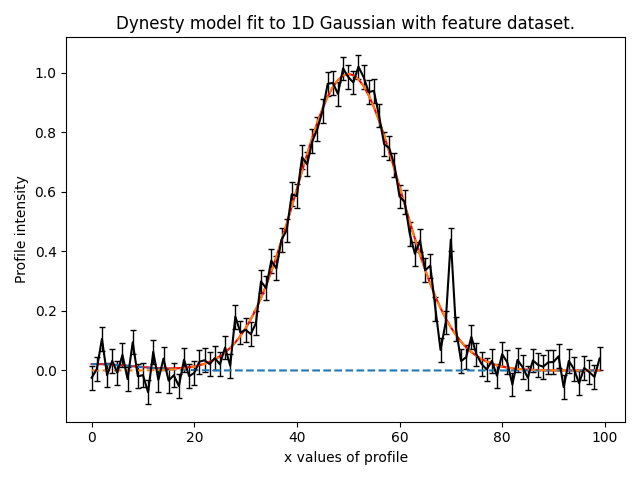
For test runs on my laptop it is ‘hit or miss’ whether the feature is fitted correctly. This is because although models including the feature corresponds to the highest likelihood solutions, they occupy a small volume in parameter space which the non linear search may miss.
The image below shows a fit where we failed to detect the feature:
Grid Search#
Lets now perform the search grid search using the SearchGridSearch object:
search = af.DynestyStatic(
    name="grid_fit",
    nlive=100,
)

grid_search = af.SearchGridSearch(
    search=dynesty,
    number_of_steps=5,
    number_of_cores=1,
)
We specified two new inputs to the SearchGridSearch:
number_of_steps: The number of steps in the grid search that are performed which is set to 5 below. Because the
prior on the parameter centre is a UniformPrior from 0.0 -> 100.0, this means the first grid search will
set the prior on the centre to be a UniformPrior from 0.0 -> 20.0. The second will run from 20.0 -> 40.0, the
third 40.0 -> 60.0, and so on.
number_of_cores: The number of cores the grid search will parallelize the run over. If number_of_cores=1, the
search is run in serial. For > 1 core, 1 core is reserved as a farmer, e.g., if number_of_cores=4 then up to 3
searches will be run in parallel.
We can now run the grid search, where we specify the parameter over which the grid search is performed, in this case
the centre of the gaussian_feature in our model.
grid_search_result = grid_search.fit(
    model=model,
    analysis=analysis,
    grid_priors=[model.gaussian_feature.centre]
)
Result#
This returns a GridSearchResult, which includes information on every model-fit performed on the grid. For example,
I can use it to print the log_evidence of all 5 model-fits.
print(grid_search_result.log_evidence_values)
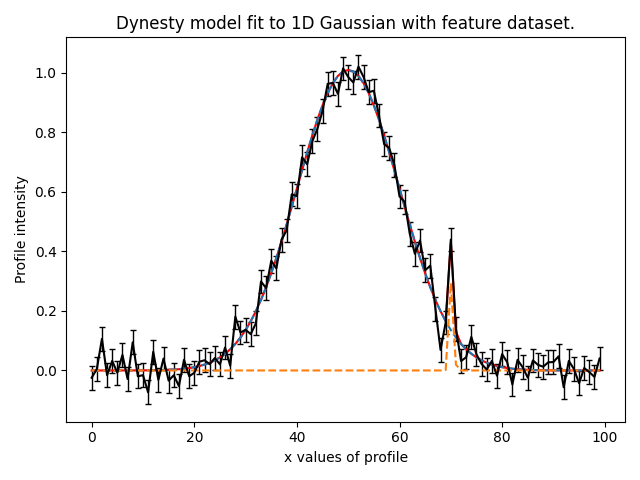
This shows a peak evidence value on the 4th cell of grid-search, where the UniformPrior on the centre ran from
60 -> 80 and therefore included the Gaussian feature. By plotting this model-fit we can see it has successfully
detected the feature.
A multi-dimensional grid search can be easily performed by adding more parameters to the grid_priors input.
The fit below belows performs a 5x5 grid search over the centres of both Gaussians
grid_search_result = grid_search.fit(
    model=model,
    analysis=analysis,
    grid_priors=[model.gaussian_feature.centre, model.gaussian_main.centre]
)